
Space effects, vinyl and tape sounds
Space effects, vinyl and tape sounds
The spatial effect changes the sense of distance and environment of the sound, while the sound style adds vinyl or tape characteristics to the sound. They are intended to be used according to personal preference and are not necessarily more accurate than the original recording.
This article belongs to OnePlayer 5.0 Function Collection.
space effect
Enter from "Sound Center → Space Effect". You can choose a preset directly, or continue adjusting the reverb and delay.
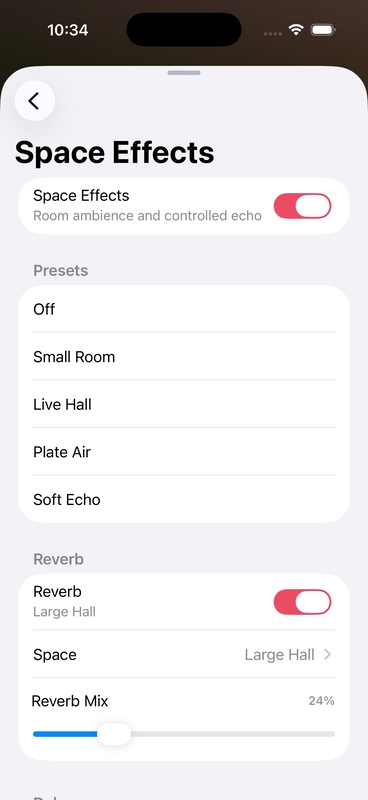
Commonly used presets include:
- Small Room: Shorter, more restrained spatial reflections.
- Live Hall: Increases the sense of openness, suitable for live recording.
- Plate Air: Plate reverb tendencies with a bright tail.
- Soft Echo: Adds a more obvious but softer delay.
- Custom: Keep your manually adjusted parameters.
reverberation
Reverb is used to simulate the reflection of sound in a space. The higher the wet sound ratio, the more obvious the sense of space, and the original sound will appear farther away.
delay
Delay creates a perceptible echo. The delay time controls the interval, the feedback controls the number of repetitions, and the low-pass parameter can make subsequent echoes gradually darker.
sound style
Enter from "Sound Center → Sound Style" and you can choose:
- Original Sound: No analog media style added.
- Vinyl Warm Sound: Added warm tendencies and adjustable vinyl texture.
- Classic Tape: More pronounced tape staining and texture.
- Pure Tape: Retains tape tendencies, but the texture is more restrained.
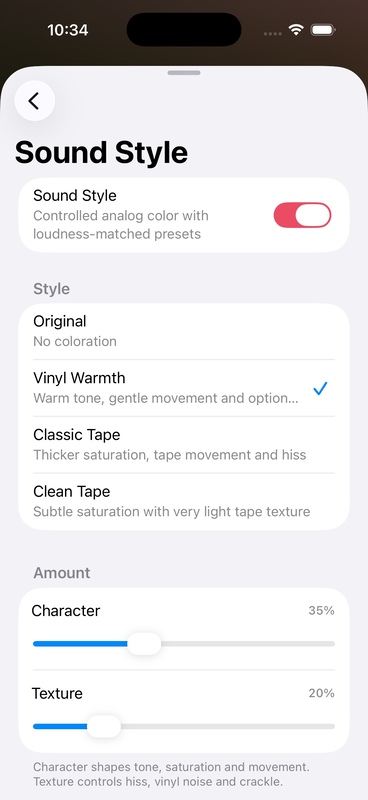
Character and Texture
- Character determines the strength of the style itself.
- Texture determines how obvious media features such as vinyl noise and tape texture are.
It is recommended to improve the Character first, and then add a small amount of Texture. Too much texture can obscure recording details, especially in quiet clips.
Do A/B comparisons using the original audition sound
- Choose a space preset or sound style.
- Play a familiar clip.
- Press and hold the ear button in the upper right corner of the sound center.
- After releasing, continue to listen to the processed sound.
- Adjust it to the point where "you won't feel the effect is too heavy even if you don't press the button."
When Direct, DoP or the original sound is in effect, the spatial effects and sound styles will be temporarily bypassed, and the original parameters will not be lost.