
DSD and Hi-Res on iPhone: USB DAC and DoP Setup
"Audio Output and DoP" centrally manages PCM output preferences and DSD transmission strategies. Please understand before setting up: Apps can request output formats, but it is the system, adapter, and DAC that jointly determine the actual results.
This article belongs to OnePlayer 5.0 Function Collection.
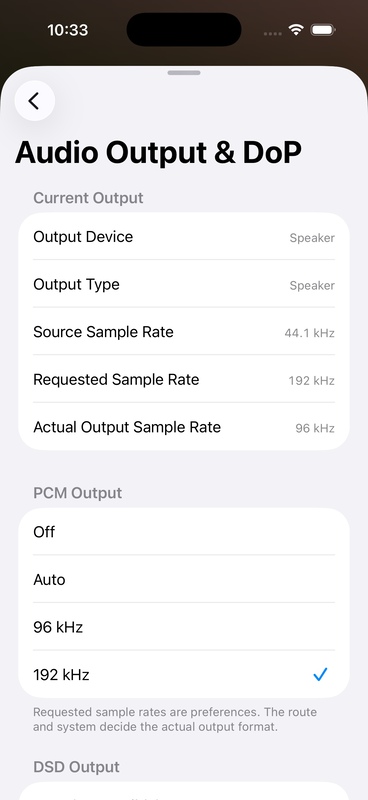
PCM output mode
OnePlayer provides the following PCM output preferences:
- Off: No active upscaling.
- Auto: Select based on file and current output capabilities.
- 96 kHz: Requests PCM output to 96 kHz.
- 192 kHz: Requests PCM output to 192 kHz.
Upscaling does not add detail to the recording that is not present in the original file. It is mainly used to fix the DAC operating sample rate or to meet the needs of a specific device link.
If "Mix playback with other apps" is turned on, or Direct is requesting the source sample rate, the saved upscaling policy may not take effect temporarily. Sound Center will display the reason.
DSD output mode
PCM
Decode DSD to PCM. Compatibility is the best, and you can continue to use functions such as EQ, loudness, spectrum, and variable speed.
DoP priority
Prioritize trying to get raw DSD data to a compatible USB DAC via DoP. If the current link does not support it, it will fall back to PCM, which is suitable for most users.
DoP only
Only DoP is allowed. It will stop and report an error when the conditions are not met, and will not convert to PCM silently. It is suitable for users who need to strictly confirm the transmission method.
What is DoP
DoP encapsulates the original DSD bitstream in identification-tagged PCM frames for transmission. PCM here is the shipping container and does not mean that DSD has been converted to PCM. DSD is extracted and decoded after the compatible DAC identifies the mark.
Why does DoP turn off sound effects?
EQ, reverb, spectrum, variable speed, or system mixing can all rewrite the sample. Once the DoP data is modified, the DAC may not be able to recognize it or even generate noise. Therefore, when DoP is in effect, OnePlayer will use an independent link and bypass:
- EQ, preamp gain and advanced filters
- Loudness equalization
- Space effects and sound styles
- real time spectrum
- Playback speed processing
- Mix and play with other apps
These settings are not deleted; they can be used again after returning to PCM.
Strict DoP volume checking
When enabled, OnePlayer will more strictly check system and device volume conditions, reducing the risk of DoP data being corrupted by system volume processing.
How to confirm whether DoP is effective
After connecting a compatible USB DAC and restarting playback of the DSD file, check the "Current Output":
- DSD transfers should display the DoP and corresponding DSD level.
- The DoP Carrier should show the actual carrier sample rate used.
- The DAC's own DSD indicator light or screen should change in sync.
DSD512 requires a 1.4112 MHz or 1.536 MHz carrier and requires support across the entire link from iPhone, adapter accessories, and DAC. Just because a DAC is labeled as supporting DSD does not necessarily mean that it supports all DSD levels.
The iOS simulator cannot connect to a real USB DAC. The simulator screenshots in this article are only used to illustrate the setup entry and cannot be used as proof that the DoP has actually been output.
FAQ
PCM still displayed after selecting DoP
Stop and restart playback of the current song and make sure you are using a DSD file, USB wired output, and a compatible DAC. DoP is not available for Bluetooth, AirPlay, and phone speakers.
DoP Only cannot be played
Explanation: The current link does not meet strict DoP conditions. You can switch to "DoP Priority" to confirm whether it can fall back safely, or check the carrier sampling rate supported by the DAC.
No immediate change after switching settings
DSD transfer mode is usually applied the next time playback starts to avoid noise caused by link re-establishment mid-playback.
Continue to learn
- View audio output and processing paths
- Complete User Guide to Sound Center
- New playback engine and real-time spectrum