
New playback engine and real-time spectrum
New playback engine and real-time spectrum
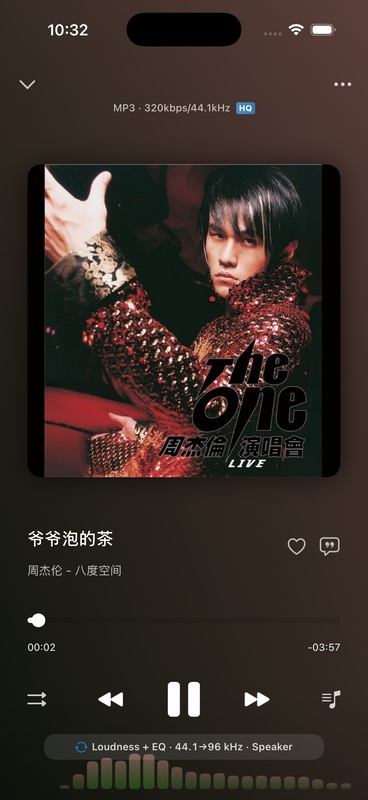
OnePlayer 5.0 fully enables a new generation of playback engine. Local files, system music libraries, and SMB and WebDAV network songs all enter a unified decoding and output link, eliminating the need to manually select between multiple playback engines.
This article belongs to OnePlayer 5.0 Function Collection.
What changed this time
- More unified decoding link: MP3, AAC, FLAC, WAV, APE, Opus, DSD and other formats are coordinated by the same set of playback processes.
- More stable high sample rate playback: The buffering strategy will be adjusted based on the sample rate and output device.
- Faster network launch: SMB, WebDAV reading, pre-buffering and decoding tasks have been rescheduled.
- Seamless connection: Minimize pauses between tracks when the formats and output conditions of the previous and following songs are compatible.
- Real-time Spectrum: The playback page can display spectrum animation that changes with the music.
Seamless transitions are still affected by file formats, sample rate changes, audio output routing, and network conditions. When the audio output needs to be reconfigured for the next song, a brief pause is normal.
Turn on real-time spectrum
- Open OnePlayer's Settings.
- Enter "Playback Settings".
- Open "Audio Spectrum Visualization".
- Select "Streamer" or "Retro LED" in "Spectrum Style".
- Return to the play page and start playing the song.
The spectrum comes from the currently playing audio data. The spectrum may be stopped when playback is paused, the app enters the background, or DoP is in effect, to reduce power consumption or protect unprocessed DSD transmissions.
Why do online songs show loading status?
Before starting to play an online song, you need to establish a connection, read the file header, parse the audio information, and prepare enough buffering. 5.0 will show clear loading status during this time, rather than making the play button look unresponsive.
If online songs cannot start playing for a long time:
- Make sure the iPhone and the server are on the same network.
- Check if the SMB or WebDAV connection is still open.
- Temporarily turn off VPN, proxy, or guest network isolation.
- Try reopening the folder or rescanning the remote repository.