
Loudness Balance: Make the song volume more consistent
Loudness Balance: Make the song volume more consistent
The listening volume of songs from different eras, different master tapes and different sources may vary greatly. Loudness equalization will automatically adjust the playback gain based on the loudness information of the song or album, reducing sudden loudness or softness when switching songs.
This article belongs to OnePlayer 5.0 Function Collection.
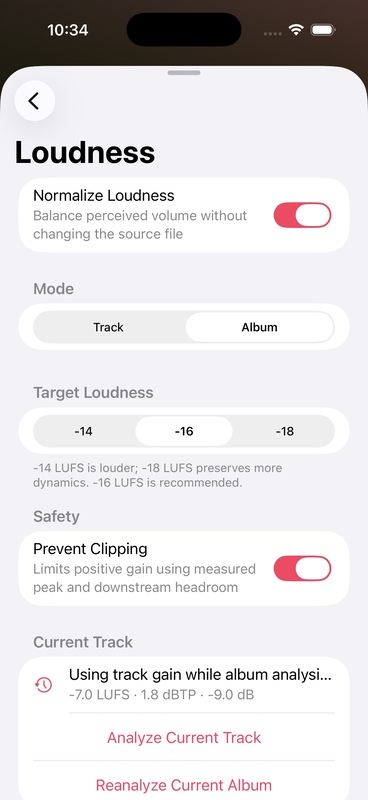
Turn on loudness equalization
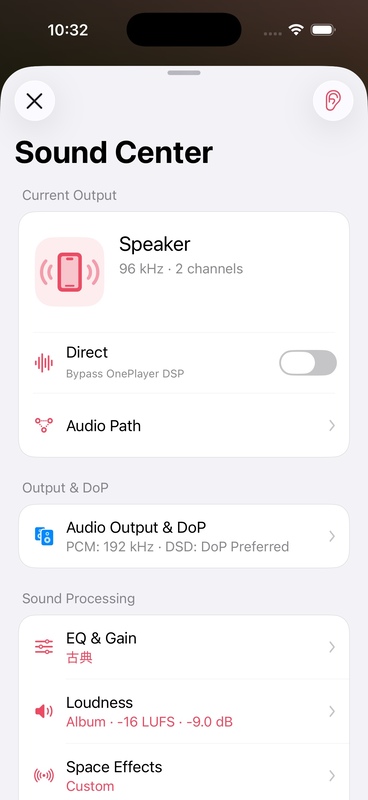
- Play a song and open Sound Center.
- Enter "Loudness".
- Turn on loudness equalization.
- Select "Single" or "Album".
- Leave clipping protection on.
Single and album mode
single
Each song is individually aligned to target loudness. Perfect for shuffling, mixing playlists or songs from different albums.
album
Use unified album gain for the same album, preserving the originally designed volume relationship between tracks. Perfect for playing live recordings, classical works or concept albums in their entirety.
Target LUFS
LUFS is a unit of measure of loudness perceived by the human ear. The closer the target value is to 0, the louder it will be overall and the easier it will be to trigger clipping protection. When there are no clear requirements, it is recommended to start from the default value, and there is no need to continuously increase the target in order to be "louder".
clipping protection
Clip protection combines True Peak and current gain to limit boost that may exceed the digital cap. When turned on, some songs may not fully reach the target loudness, but the risk of distortion can be reduced.
Analyze songs without loudness information
If the file does not have metadata available such as ReplayGain, R128, etc., OnePlayer can analyze the audio natively:
- Open "Analyze files with missing data".
- As related songs are played or browsed, tasks are queued for analysis.
- The page will display Waiting, Analyzing, or Completed.
- After the analysis results are saved, they can be used directly next time you play.
Album mode requires as complete album data as possible. If some tracks are missing or inaccessible, the page may show that the album analysis is incomplete.
Usage suggestions
- Shuffle play and daily playlist: give priority to single mode.
- Listen to a complete album from start to finish: Prioritize Album mode.
- Already using higher EQ gain: Leave clipping protection on.
- To compare processing effects: Use the Listen to Original button in the upper right corner of the Sound Center.