
OnePlayer 5.0: A new playback experience, tuned to you
Familiar songs, a new way to listen. OnePlayer 5.0 brings a substantial update to playback: a rebuilt audio pipeline, sound controls in one place, and a way to make the music on your NAS part of your everyday library.
Here are the main changes in 5.0. Follow the linked guides for detailed instructions.
At a glance
- New playback engine: unified handling of local files, the system music library and network audio, with improvements to high-sample-rate playback, streaming and track changes.
- Sound Center: view output status and adjust EQ, loudness, spatial effects and sound styles in one place.
- A clearer audio path: see the chain from the source file through processing to your output device.
- Hi-Res and DSD DoP: choose PCM output preferences and DSD transport modes to suit your equipment.
- Network library and offline caching: add SMB / WebDAV folders to your library and cache frequently played tracks locally.
A new playback engine, with visible playback status
The new engine handles local files, the system music library and network tracks through a unified playback pipeline. It also improves stability with high-sample-rate audio, network playback and track changes.
The player includes a real-time spectrum display. For more detail, the audio path shows the source format, active processing and actual device output.
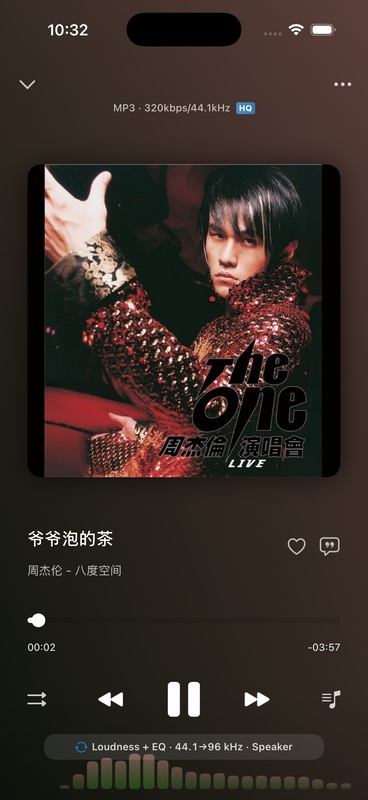
The aim is clarity: your chosen settings and the actual output can differ. The audio path helps explain what is happening during playback.
Playback engine and spectrum · Audio output and processing path
Sound Center brings your sound controls together
Sound Center puts the current output, Direct status, equalizer, loudness and spatial effects in one place.
- Adjust frequency balance with EQ, preamp gain and advanced filters.
- Use loudness normalization to reduce volume differences between songs.
- Try spatial effects and vinyl or tape sound styles.
- Press and hold to hear the original sound, then compare before deciding which settings to keep.
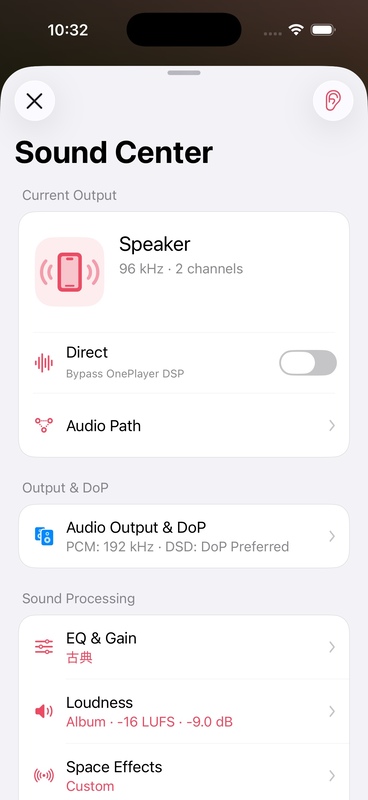
Start with a song you know well and change one setting at a time. Compare it with the original to find the sound you prefer.
Hi-Res and DSD DoP, matched to your equipment
Version 5.0 offers PCM output preferences and three DSD modes: PCM, Prefer DoP and DoP Only.
With a compatible USB DAC, Prefer DoP attempts to send the original DSD data and falls back to PCM if the current connection cannot support it. DoP Only stops and reports an error when its requirements are not met.
Actual output depends on the iPhone, adapter and DAC together. Bluetooth, AirPlay and the phone speaker cannot provide DoP. Upsampling does not add recording detail that is absent from the original file.
When DoP is active, EQ, loudness normalization, spatial effects and spectrum processing are bypassed to preserve the data. Your settings remain available when you return to PCM.
Organize your NAS library like local music
If your music lives on a NAS or home server, the network library reduces the need to browse folders repeatedly.
Connect via SMB or WebDAV and add remote folders to your library. OnePlayer supports local network device discovery, remote folder indexing, and reading remote artwork and lyrics.
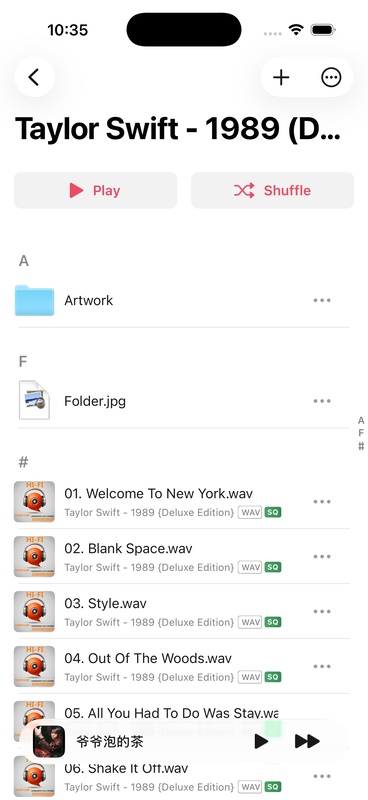
Cache your favorite tracks before leaving home. Once caching is complete, they are available offline.
Set up a remote library · Offline caching
Start with a familiar song
- Play a song you know and check its spectrum and audio path.
- Open Sound Center, confirm the current output and try one EQ or sound-style setting.
- Press and hold to compare with the original sound.
- If you use a NAS, add a favorite folder to your library and cache an album.
For instructions and requirements, see the OnePlayer 5.0 feature guide.
We hope this update makes managing your music easier and listening more enjoyable.